Featured post

new redirect for blender.org bpy docs.

http://www.blender.org/api/blender_python_api_current/ As of 10/11 november 2015 we can now link to the current api docs and not be worr...

Showing posts with label Vector. Show all posts

June 03, 2013

Normalize and Quantive

A question on BA.org looking for a script that can scale an object to within the boundaries of -1 and 1 for all axis (called normalizing, maybe erroneously) and then placing further constraint on the geometry that it must fall within grid slices of 0.1 .. so xyz can only have values between the range (-1.0, -0.9 -0.8 ....0.8, 0.9, 1.0), i made the following scripts.

here is the development version:
here is everything chucked into one loop.

Alternative code

May 20, 2013

matrix multiplication note to self

matrix multiplication, matrix * point using mathutils: using numpy: and three.js too


references

http://www.scipy.org/NumPy_for_Matlab_Users
http://docs.scipy.org/doc/numpy/reference/generated/numpy.matrix.html

June 27, 2011

randomizing geometry

this code randomizes all internal vertices on a surface of faces, it takes into account the shortest edge connected to each vertex. What it doesn't do is store the initial vertex position, so any consecutive randomize will random atop of the newly randomized coordinate

# must be in object mode
# with no verts selected on the object.

import bpy
import random
from mathutils import Vector

index_list = []
tracker_list = []

for i in bpy.context.active_object.data.edges:
index_list.append(i.vertices[0])
index_list.append(i.vertices[1])
tracker_list.append([i.vertices[0], i.vertices[1]])

# rudimentary numeric sorting, came in handy for debugging, but
# not essential for operational code.
sorted_list = sorted(index_list)

# use a set to eliminate multiples fast
sorted_set = set(sorted_list)

# track all verts with 4 or more other verts attached, store as list_internals
list_internals = []
for num in sorted_set:
if sorted_list.count(num) >= 4: # quad mesh only.
list_internals.append(num)

'''
# this selects all internal geometry.
for i in list_internals:
bpy.context.active_object.data.vertices[i].select = True
'''
print("="*20)

# store the length of the shortest connected edge, for each internal vertex
min_length_list = []
meshdata = bpy.context.active_object.data.vertices
for vert in list_internals:

# find each edge that uses this vert
# print(vert, "used in")
temp_storage = []
for pair in tracker_list:
if vert in pair:
vec1 = meshdata[pair[0]].co
vec2 = meshdata[pair[1]].co
dist = (vec1-vec2).length
temp_storage.append(dist)
# print(pair, "length is", dist)

shortest_attached_edge = min(temp_storage)
# print("shorted length is: ", shortest_attached_edge)

# store [vertnum, shortest_attached_edge]
min_length_list.append([vert, shortest_attached_edge])

for i in min_length_list:
print(i)

# randomize to .4 or shortest edge.
def randomize_vector(vector_in, amount):
amount = amount * 0.2
# random.uniform(0.7, 1.3)
vecx = random.uniform(vector_in.x-amount, vector_in.x+amount)
vecy = random.uniform(vector_in.y-amount, vector_in.y+amount)
vecz = random.uniform(vector_in.z-amount, vector_in.z+amount)

return Vector((vecx, vecy, vecz))

for i in min_length_list:
print(meshdata[i[0]].co, "randomize by ", 0.4*i[1] )
newvec = randomize_vector(meshdata[i[0]].co, 0.4*i[1])
print(newvec)
meshdata[i[0]].co = newvec


becomes

June 07, 2011

from_pydata a wave wrapping around a circle


import bpy
import math
from math import sin, radians, pi
from mathutils import Vector, Euler

# variables
z_float = 0.0
amp = 0.1
profile_radius = 1.0
n_petals = 14
n_verts = n_petals * 12
section_angle = 360.0 / n_verts
position = (2*(math.pi/(n_verts/n_petals)))

# consumables
Verts = []
Edges = []

# makes vertex coordinates
for i in range(n_verts):
# difference is a function of the position on the circumference
difference = amp * math.cos(i*position)
arm = profile_radius + difference
ampline = Vector((arm, 0.0, 0.0))

rad_angle = math.radians(section_angle*i)
myEuler = Euler((0.0, 0.0, rad_angle),'XYZ')

# changes the vector in place and because successive calls are accumulative
# we reset at the start of the loop.
ampline.rotate(myEuler)
x_float = ampline.x
y_float = ampline.y
Verts.append((x_float, y_float, z_float))

# makes edge keys
for i in range(n_verts):
if i == n_verts-1:
Edges.append([i, 0])
break
Edges.append([i, i+1])

# turns mesh into object and adds object to scene
profile_mesh = bpy.data.meshes.new("Base_Profile_Data")
profile_mesh.from_pydata(Verts, Edges, [])
profile_mesh.update()

profile_object = bpy.data.objects.new("Base_Profile", profile_mesh)
profile_object.data = profile_mesh

scene = bpy.context.scene
scene.objects.link(profile_object)
profile_object.select = True


if you add this:

difference = amp * math.cos(i*position)
if difference > 0:
difference = difference * .2

June 06, 2011

remap with input error checking

some thoughts on the remap function, this includes some invalid input checking.

# remap.py python 3.2 blender 2.57 r37243
# GPL2 license
# Author Dealga McArdle

import bpy
from mathutils import Vector

def remap(current, lower_old, upper_old, lower_new, upper_new):
'''
Remaps one range of values to another range of values, types must be float

arguments : Description
----------------------------------------------------------
current : Value to fit within the destination range
lower_old : Lowest value of the original range
upper_old : Highest value of the original range
lower_new : Lowest value of the destination range
upper_new : Highest value of the destination range

'''

# type checking, if any of the arguments are not float then return None.
lcheck = current, lower_old, upper_old, lower_new, upper_new
lstr = "current", "lower_old", "upper_old", "lower_new", "upper_new"

for i in range(len(lcheck)):
if lcheck[i].__class__ is not float:
print(lstr[i], "is not a float")
return None

# before calculations we can deal with some possible errors
if current <= lower_old: return lower_new
if current >= upper_old: return upper_new

# reusing a nicely coded Vector math utility :)
old_min = Vector((0.0, 0.0, lower_old))
old_max = Vector((0.0, 0.0, upper_old))
new_min = Vector((0.0, 0.0, lower_new))
new_max = Vector((0.0, 0.0, upper_new))

# calculate spread, fast and saves room!
spread_old = (old_max-old_min).length
spread_new = (new_max-new_min).length
factor_remap = spread_new / spread_old

current_vector = Vector((0.0, 0.0, current))
remap_temp = (current_vector-old_min).length
remapped = (remap_temp * factor_remap) + new_min[2]

# clamp output when rounding creates values beyond new range
if remapped < lower_new: return lower_new
if remapped > upper_new: return upper_new

# value seems alright!
return remapped

June 04, 2011

using from_pydata

this makes a square, 4 verts, 4 edges.
# be in object mode with nothing selected.

import bpy

# create 4 verts, string them together to make 4 edges.
coord1 = (-1.0, 1.0, 0.0)
coord2 = (-1.0, -1.0, 0.0)
coord3 = (1.0, -1.0, 0.0)
coord4 = (1.0, 1.0, 0.0)

Verts = [coord1, coord2, coord3, coord4]
Edges = [[0,1],[1,2],[2,3],[3,0]]

profile_mesh = bpy.data.meshes.new("Base_Profile_Data")
profile_mesh.from_pydata(Verts, Edges, [])
profile_mesh.update()

profile_object = bpy.data.objects.new("Base_Profile", profile_mesh)
profile_object.data = profile_mesh  # this line is redundant .. it simply overwrites .data

scene = bpy.context.scene
scene.objects.link(profile_object)
profile_object.select = True
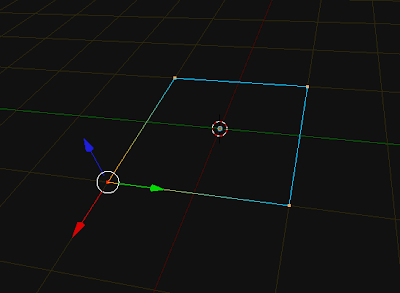


this makes a circle 12 verts, 12 edges. you can modify n_verts ( must be >= 3)
import bpy
import math
from math import sin, cos, radians

# variables
n_verts = 12
profile_radius = 1
section_angle = 360.0 / n_verts 
z_float = 0.0
Verts = []
Edges = []

for i in range(n_verts):
    x_float = sin(math.radians(section_angle*i))
    y_float = cos(math.radians(section_angle*i))
    Verts.append((x_float, y_float, z_float))

for i in range(n_verts):
    if i == n_verts-1:
        Edges.append([i, 0])
        break
    Edges.append([i, i+1])


profile_mesh = bpy.data.meshes.new("Base_Profile_Data")
profile_mesh.from_pydata(Verts, Edges, [])
profile_mesh.update()

profile_object = bpy.data.objects.new("Base_Profile", profile_mesh)
profile_object.data = profile_mesh

scene = bpy.context.scene
scene.objects.link(profile_object)
profile_object.select = True


here's a version using Euler, Vector, Vector.rotate, and math.radians
import bpy
import math
from math import radians, pi
from mathutils import Vector, Euler

# variables
n_verts = 20
profile_radius = 1
section_angle = 360.0 / n_verts 
z_float = 0.0
Verts = []
Edges = []

'''
>>> m = Vector((1.0, 0.0, 0.0))
>>> eul = Euler((0.0, 0.0, math.pi), 'XYZ')
>>> m.rotate(eul)
'''

ampline = Vector((1.0, 0.0, 0.0))
for i in range(n_verts):
    x_float = ampline.x
    y_float = ampline.y
    
    rad_angle = math.radians(section_angle)
    myEuler = Euler((0.0, 0.0, rad_angle),'XYZ')

    # changes the vector in place and is accumulative 
    ampline.rotate(myEuler)
    Verts.append((x_float, y_float, z_float))

for i in range(n_verts):
    if i == n_verts-1:
        Edges.append([i, 0])
        break
    Edges.append([i, i+1])


profile_mesh = bpy.data.meshes.new("Base_Profile_Data")
profile_mesh.from_pydata(Verts, Edges, [])
profile_mesh.update()

profile_object = bpy.data.objects.new("Base_Profile", profile_mesh)
profile_object.data = profile_mesh

scene = bpy.context.scene
scene.objects.link(profile_object)
profile_object.select = True
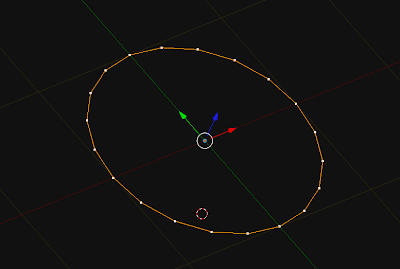


a slight variant of the above for loop in range, allows you to change the diameter as a function of the position on the circumference. This replaces lines 20-30 from the previous snippet
for i in range(n_verts):
    ampline = Vector((1.0, 0.0, 0.0))
    
    rad_angle = math.radians(section_angle*i)
    myEuler = Euler((0.0, 0.0, rad_angle),'XYZ')

    ampline.rotate(myEuler)
    x_float = ampline.x
    y_float = ampline.y
    
    Verts.append((x_float, y_float, z_float))

May 22, 2011

Blender 2.5 Python 3.2 Vector Translate Euler

updated 21 september 2012 for blender 2.6.

Hoping to figure this thing out in more detail, here's a snippet that seems to work. It also gives most basic insight into how to translate a Vector using Euler (transform?)
import bpy
from mathutils import Vector, Euler

myTrans = Vector((0.0,0.0,.5))
myEuler = Euler((0.0, 0.3, 0.0),'XYZ')
for i in range(14):
    myVec = Vector((0.0, 0.3, 0.0))
    bpy.ops.mesh.extrude_region_move(TRANSFORM_OT_translate={"value":myTrans})
    bpy.ops.transform.rotate(value=(0.3,), axis=myVec)
    myTrans.rotate(myEuler)


- Add a new circle
- select the edges
- run the script.


Here is a slight modification, it produces a spiral
import bpy
from mathutils import Vector, Euler

myTrans = Vector((0.0,0.0,.5))
myEuler = Euler((0.2, 0.3, 0.0),'XYZ')
for i in range(34):

    myVec = Vector((0.2, 0.3, 0.0))
    bpy.ops.mesh.extrude_region_move(TRANSFORM_OT_translate={"value":myTrans})

    bpy.ops.transform.rotate(value=(0.35,), axis=myVec)
    myTrans.rotate(myEuler)    


while, the one below produces a more spring like coil.
import bpy
from mathutils import Vector, Euler

translation = Vector((0.0, 0.0, .5))

for i in range(134):
    t_dict = {"value": translation}
    bpy.ops.mesh.extrude_region_move(TRANSFORM_OT_translate=t_dict)
    bpy.ops.transform.rotate(value=(0.358,), axis=Vector((0.2, 0.3, 0.0)))
    translation.rotate(Euler((0.2, 0.3, 0.0),'XYZ'))
    

i applied some subsurf to it later.

May 16, 2011

Blender 2.5 Python Extrude with Vector

import bpy
from mathutils import Vector

myVec = Vector((1.0,2.0,1.0))

bpy.ops.mesh.extrude_region_move(MESH_OT_extrude={"type":'REGION'}, 
                                 TRANSFORM_OT_translate={"value":myVec})
If you execute this script while in edit mode, with a face selected (in face selection mode) -- then the created faces along the extrusion will/may appear inverted, they revert to outside as soon as you perform other operations on a mesh. Experiment!

The 2.6 equivalent code

The best way to figure these things out is to use the reporting console, (ie, set for example a timeline window to display the information window, any user interaction will show up as code)

May 14, 2011

Blender 2.5 Python Vector Arithmetic

Blender has a sweet library of maths functions / classes, one of them is Vector. (from mathutils import Vector)
because coordinates (co) are Vector datatypes

# default cube in edit mode
>>> bpy.context.object.data.vertices[0].co
Vector((1.0, 0.9999999403953552, -1.0))
you can simply do

# let's pretend vec1 and vec2 are already defined.
>>> vec1 = Vector((2.0,2.0,2.0))
>>> vec2 = Vector((3.0,3.0,3.0))

>>> vec1+vec2
Vector((5.0, 5.0, 5.0))
that beats having to do

>>> Vector((vec1[0] + vec2[0], vec1[1] + vec2[1], vec1[2] + vec2[2]))
Vector((5.0, 5.0, 5.0))
...etc