Featured post

new redirect for blender.org bpy docs.

http://www.blender.org/api/blender_python_api_current/ As of 10/11 november 2015 we can now link to the current api docs and not be worr...

Showing posts with label Edge Keys. Show all posts

March 09, 2014

Tools for debugging Mesh Editing scripts (Index Visualizer and Debug mode)

I love many things about Blender, but debugging scripts that interact with Meshes is not one of them. It should be easy to visualize Edge / Vertex / Face indices. Don't worry, this isn't a rant without solution.

Exhibit 1

`bpy.app.debug = True` will add a set of options to the Display panel while in Edit Mode. The options are great but depending on theme and DPI the indices are difficult to make out. With softblend theme the overlay information borders on useless.


Exhibit 2

This script by Crouch, CoDEmanX and additions by me does pretty much the same but draws polygons behind the numbers for better contrast, this is customizable so usable no matter which theme you may be most comfortable with.

I'm quite happy with the script solution, it would be nice to have it available on each Blender installation as part of the `debug` mode. Anyone learning the ways of geometry related coding would benefit.

Improvements?

My underlay addition can be optimized by calculating the standard polygon once per possible width of index number. (quick implementation of said method) Further minimal mode would ditch the rounded corner and be much lighter, but if you have to visualize many vertex / edge / face indices you probably don't understand the algorithm you are trying to implement.

July 03, 2011

Sorting Edge keys Part II

mostly rewritten, this is currently prototype so clunky/verbose code. but works ! :) assumes the polyline (edgebased) object is
1) not closed,
2) not interupted,
3) not already correctly sorted


import bpy

print("\n")
print("="*50)

cobject = bpy.context.active_object

idx_vert_list = []
for i in cobject.data.vertices:
idx_vert_list.append([i.index, i.co])
# print(i.co, i.index)

for i in idx_vert_list:
print(i)


# existing edges
print("=== +")
ex_edges = []
existing_edges = []
for i in cobject.data.edges:
edge_keys = [i.vertices[0], i.vertices[1]]
ex_edges.append(edge_keys)
item = [i.index, edge_keys]
existing_edges.append(item)
print(item)


# proposed edges
print(" becomes")
proposed_edges = []
num_edges = len(existing_edges)
for i in range(num_edges):
item2 = [i,[i,i+1]]
proposed_edges.append(item2)
print(item2)


# find first end point, discontinue after finding a lose end.
current_sequence = []
iteration = 0
while(iteration <= num_edges):
count_presence = 0
for i in existing_edges:
if iteration in i[1]:
count_presence += 1

print("iteration: ", iteration, count_presence)
if count_presence == 1:
break
iteration += 1

init_num = iteration
print("end point", init_num)


# find connected sequence
seq_list = []
glist = []

def generate_ladder(starter, edge_key_list):

def find_vert_connected(vert, mlist):
if len(mlist) == 1:
for g in mlist:
for k in g:
if k is not vert:
return(k, -1)

for i in mlist:
if vert in i:
idx = mlist.index(i)
for m in i:
if m is not vert:
return(m, idx)

stairs = []
while(True):
stairs.append(starter)
starter, idx = find_vert_connected(starter, edge_key_list)
if idx == -1:
stairs.append(starter)
break
edge_key_list.pop(idx)
return(stairs)

seq_list = generate_ladder(init_num, ex_edges)


# make verts and edges
Verts = []
Edges = []

for i in range(len(idx_vert_list)):
print(i)
old_idx = seq_list[i]
myVec = idx_vert_list[old_idx][1]
Verts.append((myVec.x, myVec.y, myVec.z))

for i in Verts: print(i)

for i in proposed_edges:
Edges.append(tuple(i[1]))
print(Edges)

bpy.ops.object.mode_set(mode = 'OBJECT')

prof_mesh = bpy.data.meshes.new("test_mesh2")
prof_mesh.from_pydata(Verts, Edges, [])
prof_mesh.update()
cobject.data = prof_mesh

bpy.ops.object.mode_set(mode = 'EDIT')

This code inspects the edges/verts, strings them in the correct order, makes a new mesh, replaces the current object.data (mesh) with it.


#terminal output.
==================================================
[0, Vector((1.0, 0.9999999403953552, 0.0))]
[1, Vector((0.9999999403953552, -0.9999999403953552, 0.0))]
[2, Vector((-1.0000001192092896, -0.9999998211860657, 0.0))]
[3, Vector((-0.9999996423721313, 1.0000003576278687, 0.0))]
[4, Vector((1.0, 0.0, 0.0))]
=== +
[0, [1, 2]]
[1, [2, 3]]
[2, [0, 4]]
[3, [1, 4]]
becomes
[0, [0, 1]]
[1, [1, 2]]
[2, [2, 3]]
[3, [3, 4]]
iteration: 0 1
end point 0
[0, 4, 1, 2, 3]
(1.0, 0.9999999403953552, 1.0)
(1.0, 0.0, 1.0)
(0.9999999403953552, -0.9999999403953552, 1.0)
(-1.0000001192092896, -0.9999998211860657, 1.0)
(-0.9999996423721313, 1.0000003576278687, 1.0)
[(0, 1), (1, 2), (2, 3), (3, 4)]
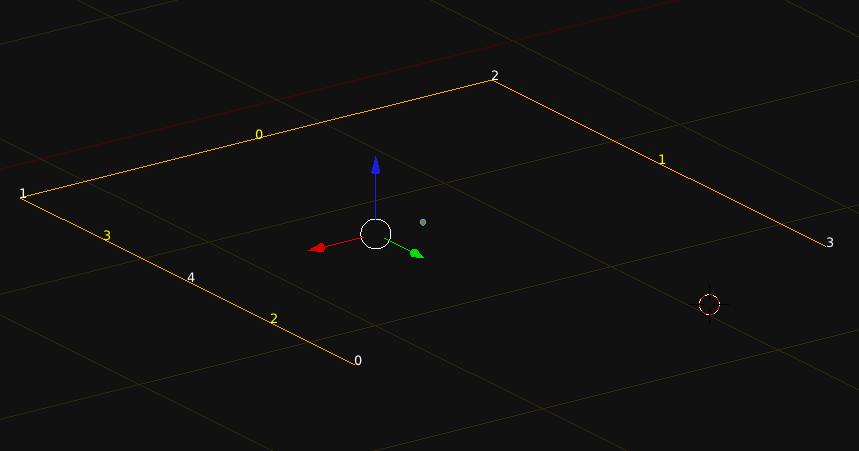
looks like

July 01, 2011

Sorting Edge keys Part I

this post has a second part to it here

This code is dying for a rewrite. The code takes a jumbled up sequence of edges that would normally describe a polyline or 'edgeloop', where the vertex sequence is comparable to edge_key_list below. This code assumes a few things.

1) no interuptions
2) no duplicates
3) you have already figured out the index of one of the end vertices.
4) the edge loop is not closed.

edge_key_list = [[5, 2],[2, 3],[3, 10],[10, 24],[24, 19],
[19, 6],[6, 1],[1, 20],[20, 13],[13, 9],[9, 12],[12, 8],[8, 23],[23, 15],
[15, 18],[18, 17],[17, 14],[11, 22],[22, 4],[4, 21],[14, 11],[0, 5],[0, 16],
[16, 7]]

def find_vert_connected(vert, mlist):
    if len(mlist) == 1:
       for g in mlist:
            for k in g:
                if k is not vert:
                    return(k, -1)
        
    for i in mlist:
        if vert in i:
            idx = mlist.index(i)
            for m in i:
                if m is not vert:
                    return(m, idx)

def generate_ladder(starter, edge_key_list):
    stairs = []
    while(True):
        stairs.append(starter)
        starter, idx = find_vert_connected(starter,  edge_key_list)
        if idx == -1:
            stairs.append(starter)
            break
        edge_key_list.pop(idx)

    return(stairs)

print(generate_ladder(7, edge_key_list))
#
# output will be this
'''
[7, 16, 0, 5, 2, 3, 10, 24, 19, 6, 1, 20, 13, 9, 12, 8, 23, 15, 18, 17, 14, 11, 22, 4, 21]
'''
inside blender this might look like

#mesh_edge_sequence_rectifier.py
'''
Sometimes when doing a lathe like operation such as with the Screw Modifier,
the order in which the verts are stringed together to create the profile
(polyline, edgeloop) becomes important to the calculation of face normals for
the screwed geometry. 

''' 
# assumption 1  : edge loop is not closed.
# assumptino 2  : no duplicates ,make sure no verts are identical?
# assumption 3  : includes non consequtive edge keys, ie [0,1],[3,2],..[2,1]
# assertion 1   : edge has a definite start/end, can be either of the two end points.

import bpy

edge_key_list = []
for i in bpy.context.active_object.data.edges:
    edge_key_list.append([i.vertices[0], i.vertices[1]])

'''
old
edge_key_list = [[5, 2],[2, 3],[3, 10],[10, 24],[24, 19],
[19, 6],[6, 1],[1, 20],[20, 13],[13, 9],[9, 12],[12, 8],[8, 23],[23, 15],
[15, 18],[18, 17],[17, 14],[11, 22],[22, 4],[4, 21],[14, 11],[0, 5],[0, 16],
[16, 7]]

'''
# count vertices. ( remember to add 1, because we start counting from 0 )
vert_count = len(edge_key_list)

'''
new 
new_key_list = [0,1],[1,2],[2,3],....[23,24]
'''
# new key list should look like the new one
new_key_list = []
for k in range(vert_count):
    new_key_list.append([k, k+1])

# find all verts that only occur once in the edge key list.
sort_list = []
for i in edge_key_list:
    for l in i:
        sort_list.append(l)


# could use this to figure out if there are interuptions in the edge loop
# here i will only prototype using count == 1.
start_vert = 0
for i in range(len(set(sort_list))):
    if sort_list.count(i) == 1:
        #print("use :", i)
        start_vert = i
        break
    

# performing a copy of the list
shrink_list = []
for i in edge_key_list:
    shrink_list.append(i)


# something about the looks of this function suggests it could be condensed to 4 lines
def find_vert_connected(vert, mlist):
    if len(mlist) == 1:
       for g in mlist:
            for k in g:
                if k is not vert:
                    return(k, -1)
        
    for i in mlist:
        if vert in i:
            idx = mlist.index(i)
            for m in i:
                if m is not vert:
                    return(m, idx)


def generate_ladder(starter, edge_key_list):
    stairs = []
    while(True):
        stairs.append(starter)
        starter, idx = find_vert_connected(starter,  edge_key_list)
        if idx == -1:
            stairs.append(starter)
            break
        edge_key_list.pop(idx)

    return(stairs)

numerically_sorted_list = generate_ladder(7, shrink_list)
print(numerically_sorted_list)
To find out which operations are the most costly on lists, check the python wiki: http://wiki.python.org/moin/TimeComplexity

June 07, 2011

from_pydata a wave wrapping around a circle


import bpy
import math
from math import sin, radians, pi
from mathutils import Vector, Euler

# variables
z_float = 0.0
amp = 0.1
profile_radius = 1.0
n_petals = 14
n_verts = n_petals * 12
section_angle = 360.0 / n_verts
position = (2*(math.pi/(n_verts/n_petals)))

# consumables
Verts = []
Edges = []

# makes vertex coordinates
for i in range(n_verts):
# difference is a function of the position on the circumference
difference = amp * math.cos(i*position)
arm = profile_radius + difference
ampline = Vector((arm, 0.0, 0.0))

rad_angle = math.radians(section_angle*i)
myEuler = Euler((0.0, 0.0, rad_angle),'XYZ')

# changes the vector in place and because successive calls are accumulative
# we reset at the start of the loop.
ampline.rotate(myEuler)
x_float = ampline.x
y_float = ampline.y
Verts.append((x_float, y_float, z_float))

# makes edge keys
for i in range(n_verts):
if i == n_verts-1:
Edges.append([i, 0])
break
Edges.append([i, i+1])

# turns mesh into object and adds object to scene
profile_mesh = bpy.data.meshes.new("Base_Profile_Data")
profile_mesh.from_pydata(Verts, Edges, [])
profile_mesh.update()

profile_object = bpy.data.objects.new("Base_Profile", profile_mesh)
profile_object.data = profile_mesh

scene = bpy.context.scene
scene.objects.link(profile_object)
profile_object.select = True


if you add this:

difference = amp * math.cos(i*position)
if difference > 0:
difference = difference * .2

June 04, 2011

using from_pydata

this makes a square, 4 verts, 4 edges.
# be in object mode with nothing selected.

import bpy

# create 4 verts, string them together to make 4 edges.
coord1 = (-1.0, 1.0, 0.0)
coord2 = (-1.0, -1.0, 0.0)
coord3 = (1.0, -1.0, 0.0)
coord4 = (1.0, 1.0, 0.0)

Verts = [coord1, coord2, coord3, coord4]
Edges = [[0,1],[1,2],[2,3],[3,0]]

profile_mesh = bpy.data.meshes.new("Base_Profile_Data")
profile_mesh.from_pydata(Verts, Edges, [])
profile_mesh.update()

profile_object = bpy.data.objects.new("Base_Profile", profile_mesh)
profile_object.data = profile_mesh  # this line is redundant .. it simply overwrites .data

scene = bpy.context.scene
scene.objects.link(profile_object)
profile_object.select = True


this makes a circle 12 verts, 12 edges. you can modify n_verts ( must be >= 3)
import bpy
import math
from math import sin, cos, radians

# variables
n_verts = 12
profile_radius = 1
section_angle = 360.0 / n_verts 
z_float = 0.0
Verts = []
Edges = []

for i in range(n_verts):
    x_float = sin(math.radians(section_angle*i))
    y_float = cos(math.radians(section_angle*i))
    Verts.append((x_float, y_float, z_float))

for i in range(n_verts):
    if i == n_verts-1:
        Edges.append([i, 0])
        break
    Edges.append([i, i+1])


profile_mesh = bpy.data.meshes.new("Base_Profile_Data")
profile_mesh.from_pydata(Verts, Edges, [])
profile_mesh.update()

profile_object = bpy.data.objects.new("Base_Profile", profile_mesh)
profile_object.data = profile_mesh

scene = bpy.context.scene
scene.objects.link(profile_object)
profile_object.select = True


here's a version using Euler, Vector, Vector.rotate, and math.radians
import bpy
import math
from math import radians, pi
from mathutils import Vector, Euler

# variables
n_verts = 20
profile_radius = 1
section_angle = 360.0 / n_verts 
z_float = 0.0
Verts = []
Edges = []

'''
>>> m = Vector((1.0, 0.0, 0.0))
>>> eul = Euler((0.0, 0.0, math.pi), 'XYZ')
>>> m.rotate(eul)
'''

ampline = Vector((1.0, 0.0, 0.0))
for i in range(n_verts):
    x_float = ampline.x
    y_float = ampline.y
    
    rad_angle = math.radians(section_angle)
    myEuler = Euler((0.0, 0.0, rad_angle),'XYZ')

    # changes the vector in place and is accumulative 
    ampline.rotate(myEuler)
    Verts.append((x_float, y_float, z_float))

for i in range(n_verts):
    if i == n_verts-1:
        Edges.append([i, 0])
        break
    Edges.append([i, i+1])


profile_mesh = bpy.data.meshes.new("Base_Profile_Data")
profile_mesh.from_pydata(Verts, Edges, [])
profile_mesh.update()

profile_object = bpy.data.objects.new("Base_Profile", profile_mesh)
profile_object.data = profile_mesh

scene = bpy.context.scene
scene.objects.link(profile_object)
profile_object.select = True


a slight variant of the above for loop in range, allows you to change the diameter as a function of the position on the circumference. This replaces lines 20-30 from the previous snippet
for i in range(n_verts):
    ampline = Vector((1.0, 0.0, 0.0))
    
    rad_angle = math.radians(section_angle*i)
    myEuler = Euler((0.0, 0.0, rad_angle),'XYZ')

    ampline.rotate(myEuler)
    x_float = ampline.x
    y_float = ampline.y
    
    Verts.append((x_float, y_float, z_float))

May 14, 2011

Blender 2.5 Printing Edge Keys

quick example:
import bpy

for item in bpy.data.objects:
if item.type == 'MESH':
for e in item.data.edge_keys:
print(e)