Featured post

new redirect for blender.org bpy docs.

http://www.blender.org/api/blender_python_api_current/ As of 10/11 november 2015 we can now link to the current api docs and not be worr...

Showing posts with label mathutils. Show all posts

March 29, 2014

mathutils.geometry.intersect_point_line

Another note to self. Originally I coded my own routine for this function. it calculates the distance between intx and a, and intx and b and if those two quantities sum up to something larger than the distance between a,b then the point does not lie on the edge.

So now I'll use this instead:

June 06, 2011

remap with input error checking

some thoughts on the remap function, this includes some invalid input checking.

# remap.py python 3.2 blender 2.57 r37243
# GPL2 license
# Author Dealga McArdle

import bpy
from mathutils import Vector

def remap(current, lower_old, upper_old, lower_new, upper_new):
'''
Remaps one range of values to another range of values, types must be float

arguments : Description
----------------------------------------------------------
current : Value to fit within the destination range
lower_old : Lowest value of the original range
upper_old : Highest value of the original range
lower_new : Lowest value of the destination range
upper_new : Highest value of the destination range

'''

# type checking, if any of the arguments are not float then return None.
lcheck = current, lower_old, upper_old, lower_new, upper_new
lstr = "current", "lower_old", "upper_old", "lower_new", "upper_new"

for i in range(len(lcheck)):
if lcheck[i].__class__ is not float:
print(lstr[i], "is not a float")
return None

# before calculations we can deal with some possible errors
if current <= lower_old: return lower_new
if current >= upper_old: return upper_new

# reusing a nicely coded Vector math utility :)
old_min = Vector((0.0, 0.0, lower_old))
old_max = Vector((0.0, 0.0, upper_old))
new_min = Vector((0.0, 0.0, lower_new))
new_max = Vector((0.0, 0.0, upper_new))

# calculate spread, fast and saves room!
spread_old = (old_max-old_min).length
spread_new = (new_max-new_min).length
factor_remap = spread_new / spread_old

current_vector = Vector((0.0, 0.0, current))
remap_temp = (current_vector-old_min).length
remapped = (remap_temp * factor_remap) + new_min[2]

# clamp output when rounding creates values beyond new range
if remapped < lower_new: return lower_new
if remapped > upper_new: return upper_new

# value seems alright!
return remapped

May 22, 2011

Blender 2.5 Python 3.2 Vector Translate Euler

updated 21 september 2012 for blender 2.6.

Hoping to figure this thing out in more detail, here's a snippet that seems to work. It also gives most basic insight into how to translate a Vector using Euler (transform?)
import bpy
from mathutils import Vector, Euler

myTrans = Vector((0.0,0.0,.5))
myEuler = Euler((0.0, 0.3, 0.0),'XYZ')
for i in range(14):
    myVec = Vector((0.0, 0.3, 0.0))
    bpy.ops.mesh.extrude_region_move(TRANSFORM_OT_translate={"value":myTrans})
    bpy.ops.transform.rotate(value=(0.3,), axis=myVec)
    myTrans.rotate(myEuler)


- Add a new circle
- select the edges
- run the script.
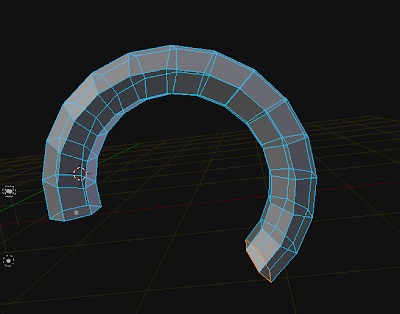


Here is a slight modification, it produces a spiral
import bpy
from mathutils import Vector, Euler

myTrans = Vector((0.0,0.0,.5))
myEuler = Euler((0.2, 0.3, 0.0),'XYZ')
for i in range(34):

    myVec = Vector((0.2, 0.3, 0.0))
    bpy.ops.mesh.extrude_region_move(TRANSFORM_OT_translate={"value":myTrans})

    bpy.ops.transform.rotate(value=(0.35,), axis=myVec)
    myTrans.rotate(myEuler)    
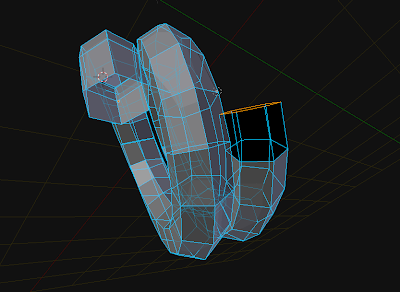


while, the one below produces a more spring like coil.
import bpy
from mathutils import Vector, Euler

translation = Vector((0.0, 0.0, .5))

for i in range(134):
    t_dict = {"value": translation}
    bpy.ops.mesh.extrude_region_move(TRANSFORM_OT_translate=t_dict)
    bpy.ops.transform.rotate(value=(0.358,), axis=Vector((0.2, 0.3, 0.0)))
    translation.rotate(Euler((0.2, 0.3, 0.0),'XYZ'))
    

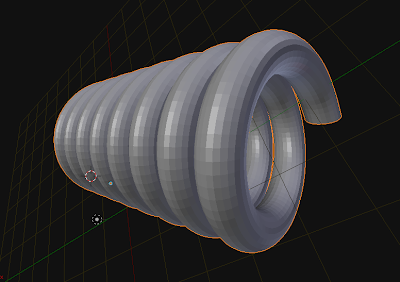
i applied some subsurf to it later.