Featured post

new redirect for blender.org bpy docs.

http://www.blender.org/api/blender_python_api_current/ As of 10/11 november 2015 we can now link to the current api docs and not be worr...

Showing posts with label from_pydata. Show all posts

May 07, 2014

Bmesh_from_pydata

maybe there are easier ways, but this facilitated what I needed it for
def bmesh_from_pydata(verts=[], edges=[], faces=[]):
    """
    Return a BMesh built from verts, edges, and faces.
    
    :arg verts: The verts to use (required).
    :type context: list
    :arg edges: The verts to use (optional).
    :type context: list
    :arg faces: The verts to use (optional).
    :type context: list

    :return: a BMesh.
    :rtype: :class:`bmesh.types.BMesh`
    """

    if not verts:
        print("verts data seems empty")
        return

    bm = bmesh.new()
    [bm.verts.new(co) for co in verts]
    bm.verts.index_update()

    if faces:
        for face in faces:
            bm.faces.new(tuple(bm.verts[i] for i in face))
        bm.faces.index_update()

    if edges:
        for edge in edges:
            edge_seq = tuple(bm.verts[i] for i in edge)
            try:
                bm.edges.new(edge_seq)
            except ValueError:
                # edge exists!
                pass

        bm.edges.index_update()

    return bm

July 09, 2012

Make Unique Geometry (no shared vertices)

This is the basic approach to ripping all geometry apart. doesn't play nice with UV and ignores world matrix (ie, is stuff scaled rotated translated or not..) :)

Pretty soon afterwards I wanted a way to preserve UV information per face. The following script was born. link : todo

May 10, 2012

Cycles materials from dribbble generated swatch

Materials and Nodes

Dribbble generates .aco (swatch) schemes from any upload, that's great for archiving my favourite color schemes. To avoid headache and lowlevel python i've resorted to leeching the color values directly from the html, instead of decoding the .aco file. Currently the snippet creates cycles node materials from swatches using urllib and extracts it using regex. The idea is to keep things simple in the event that dribbble changes their html.

This will facilitate using cool palettes to generate abstract visuals (but cycles only)

But Wait! There is more!

The following version also creates primitive cubes and assigns them each a swatch colour.
becomes

And more!

Here's another version It's a small rewrite to get an idea of what kind of code juggling is permitted within python - it's a bit more modular but might take more intuition to read. This was an intermediate step to the next iteration.

This revision demonstrates the evils of using ops, i would prefer to make the geometry mathematically or part math part lathe operation.

Programmed Lathing!

If we look at the previous snippet, it leaves a nasty taste because it amounts to no more than a macro coding. Let's see what a more low level coded interpretation looks like: using from_pydata

July 04, 2011

Making a cube using from_pydata

Some primitives, generally geometry is built using triangles (tris) or quadrangles (quads)

Quads

import bpy

verts = [(1.0, 1.0, -1.0),
         (1.0, -1.0, -1.0),
        (-1.0, -1.0, -1.0),
        (-1.0, 1.0, -1.0),
         (1.0, 1.0, 1.0),
         (1.0, -1.0, 1.0),
        (-1.0, -1.0, 1.0),
        (-1.0, 1.0, 1.0)]

faces = [(0, 1, 2, 3),
         (4, 7, 6, 5),
         (0, 4, 5, 1),
         (1, 5, 6, 2),
         (2, 6, 7, 3),
         (4, 0, 3, 7)]

mesh_data = bpy.data.meshes.new("cube_mesh_data")
mesh_data.from_pydata(verts, [], faces)
mesh_data.update() # (calc_edges=True) not needed here

cube_object = bpy.data.objects.new("Cube_Object", mesh_data)

scene = bpy.context.scene  
scene.objects.link(cube_object)  
cube_object.select = True  

Tris

verts = [
(-0.285437,-0.744976,-0.471429),
(-0.285437,-0.744976,-2.471429),
(1.714563,-0.744976,-2.471429),
(1.714563,-0.744976,-0.471429),
(-0.285437,1.255024,-0.471429),
(-0.285437,1.255024,-2.471429),
(1.714563,1.255024,-2.471429),
(1.714563,1.255024,-0.471429)]

faces =  [
(4,5,1),
(5,6,2),
(6,7,3),
(4,0,7),
(0,1,2),
(7,6,5),
(0,4,1),
(1,5,2),
(2,6,3),
(7,0,3),
(3,0,2),
(4,7,5)]

import bpy  
  
mesh_data = bpy.data.meshes.new("cube_mesh_data")  
mesh_data.from_pydata(verts, [], faces)  
mesh_data.update() # (calc_edges=True) not needed here  
  
cube_object = bpy.data.objects.new("Cube_Object", mesh_data)  
  
scene = bpy.context.scene    
scene.objects.link(cube_object)    
cube_object.select = True    

July 03, 2011

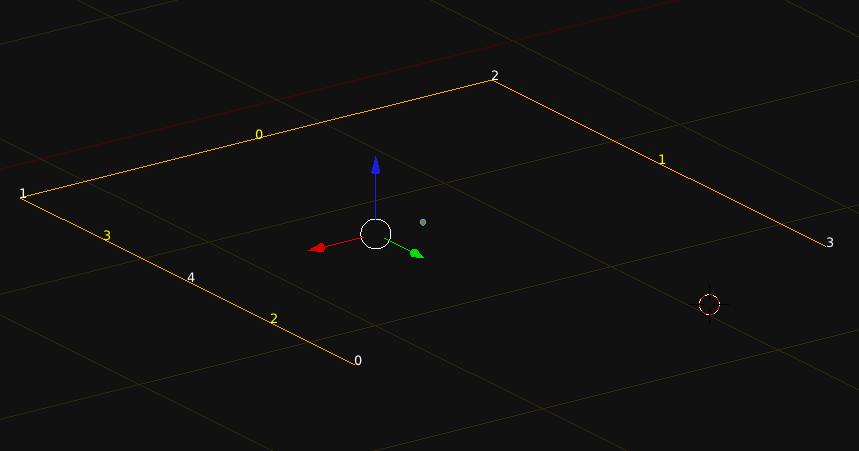
Sorting Edge keys Part II

mostly rewritten, this is currently prototype so clunky/verbose code. but works ! :) assumes the polyline (edgebased) object is
1) not closed,
2) not interupted,
3) not already correctly sorted


import bpy

print("\n")
print("="*50)

cobject = bpy.context.active_object

idx_vert_list = []
for i in cobject.data.vertices:
idx_vert_list.append([i.index, i.co])
# print(i.co, i.index)

for i in idx_vert_list:
print(i)


# existing edges
print("=== +")
ex_edges = []
existing_edges = []
for i in cobject.data.edges:
edge_keys = [i.vertices[0], i.vertices[1]]
ex_edges.append(edge_keys)
item = [i.index, edge_keys]
existing_edges.append(item)
print(item)


# proposed edges
print(" becomes")
proposed_edges = []
num_edges = len(existing_edges)
for i in range(num_edges):
item2 = [i,[i,i+1]]
proposed_edges.append(item2)
print(item2)


# find first end point, discontinue after finding a lose end.
current_sequence = []
iteration = 0
while(iteration <= num_edges):
count_presence = 0
for i in existing_edges:
if iteration in i[1]:
count_presence += 1

print("iteration: ", iteration, count_presence)
if count_presence == 1:
break
iteration += 1

init_num = iteration
print("end point", init_num)


# find connected sequence
seq_list = []
glist = []

def generate_ladder(starter, edge_key_list):

def find_vert_connected(vert, mlist):
if len(mlist) == 1:
for g in mlist:
for k in g:
if k is not vert:
return(k, -1)

for i in mlist:
if vert in i:
idx = mlist.index(i)
for m in i:
if m is not vert:
return(m, idx)

stairs = []
while(True):
stairs.append(starter)
starter, idx = find_vert_connected(starter, edge_key_list)
if idx == -1:
stairs.append(starter)
break
edge_key_list.pop(idx)
return(stairs)

seq_list = generate_ladder(init_num, ex_edges)


# make verts and edges
Verts = []
Edges = []

for i in range(len(idx_vert_list)):
print(i)
old_idx = seq_list[i]
myVec = idx_vert_list[old_idx][1]
Verts.append((myVec.x, myVec.y, myVec.z))

for i in Verts: print(i)

for i in proposed_edges:
Edges.append(tuple(i[1]))
print(Edges)

bpy.ops.object.mode_set(mode = 'OBJECT')

prof_mesh = bpy.data.meshes.new("test_mesh2")
prof_mesh.from_pydata(Verts, Edges, [])
prof_mesh.update()
cobject.data = prof_mesh

bpy.ops.object.mode_set(mode = 'EDIT')

This code inspects the edges/verts, strings them in the correct order, makes a new mesh, replaces the current object.data (mesh) with it.


#terminal output.
==================================================
[0, Vector((1.0, 0.9999999403953552, 0.0))]
[1, Vector((0.9999999403953552, -0.9999999403953552, 0.0))]
[2, Vector((-1.0000001192092896, -0.9999998211860657, 0.0))]
[3, Vector((-0.9999996423721313, 1.0000003576278687, 0.0))]
[4, Vector((1.0, 0.0, 0.0))]
=== +
[0, [1, 2]]
[1, [2, 3]]
[2, [0, 4]]
[3, [1, 4]]
becomes
[0, [0, 1]]
[1, [1, 2]]
[2, [2, 3]]
[3, [3, 4]]
iteration: 0 1
end point 0
[0, 4, 1, 2, 3]
(1.0, 0.9999999403953552, 1.0)
(1.0, 0.0, 1.0)
(0.9999999403953552, -0.9999999403953552, 1.0)
(-1.0000001192092896, -0.9999998211860657, 1.0)
(-0.9999996423721313, 1.0000003576278687, 1.0)
[(0, 1), (1, 2), (2, 3), (3, 4)]
looks like

June 07, 2011

from_pydata a wave wrapping around a circle


import bpy
import math
from math import sin, radians, pi
from mathutils import Vector, Euler

# variables
z_float = 0.0
amp = 0.1
profile_radius = 1.0
n_petals = 14
n_verts = n_petals * 12
section_angle = 360.0 / n_verts
position = (2*(math.pi/(n_verts/n_petals)))

# consumables
Verts = []
Edges = []

# makes vertex coordinates
for i in range(n_verts):
# difference is a function of the position on the circumference
difference = amp * math.cos(i*position)
arm = profile_radius + difference
ampline = Vector((arm, 0.0, 0.0))

rad_angle = math.radians(section_angle*i)
myEuler = Euler((0.0, 0.0, rad_angle),'XYZ')

# changes the vector in place and because successive calls are accumulative
# we reset at the start of the loop.
ampline.rotate(myEuler)
x_float = ampline.x
y_float = ampline.y
Verts.append((x_float, y_float, z_float))

# makes edge keys
for i in range(n_verts):
if i == n_verts-1:
Edges.append([i, 0])
break
Edges.append([i, i+1])

# turns mesh into object and adds object to scene
profile_mesh = bpy.data.meshes.new("Base_Profile_Data")
profile_mesh.from_pydata(Verts, Edges, [])
profile_mesh.update()

profile_object = bpy.data.objects.new("Base_Profile", profile_mesh)
profile_object.data = profile_mesh

scene = bpy.context.scene
scene.objects.link(profile_object)
profile_object.select = True


if you add this:

difference = amp * math.cos(i*position)
if difference > 0:
difference = difference * .2

June 04, 2011

using from_pydata

this makes a square, 4 verts, 4 edges.
# be in object mode with nothing selected.

import bpy

# create 4 verts, string them together to make 4 edges.
coord1 = (-1.0, 1.0, 0.0)
coord2 = (-1.0, -1.0, 0.0)
coord3 = (1.0, -1.0, 0.0)
coord4 = (1.0, 1.0, 0.0)

Verts = [coord1, coord2, coord3, coord4]
Edges = [[0,1],[1,2],[2,3],[3,0]]

profile_mesh = bpy.data.meshes.new("Base_Profile_Data")
profile_mesh.from_pydata(Verts, Edges, [])
profile_mesh.update()

profile_object = bpy.data.objects.new("Base_Profile", profile_mesh)
profile_object.data = profile_mesh  # this line is redundant .. it simply overwrites .data

scene = bpy.context.scene
scene.objects.link(profile_object)
profile_object.select = True


this makes a circle 12 verts, 12 edges. you can modify n_verts ( must be >= 3)
import bpy
import math
from math import sin, cos, radians

# variables
n_verts = 12
profile_radius = 1
section_angle = 360.0 / n_verts 
z_float = 0.0
Verts = []
Edges = []

for i in range(n_verts):
    x_float = sin(math.radians(section_angle*i))
    y_float = cos(math.radians(section_angle*i))
    Verts.append((x_float, y_float, z_float))

for i in range(n_verts):
    if i == n_verts-1:
        Edges.append([i, 0])
        break
    Edges.append([i, i+1])


profile_mesh = bpy.data.meshes.new("Base_Profile_Data")
profile_mesh.from_pydata(Verts, Edges, [])
profile_mesh.update()

profile_object = bpy.data.objects.new("Base_Profile", profile_mesh)
profile_object.data = profile_mesh

scene = bpy.context.scene
scene.objects.link(profile_object)
profile_object.select = True


here's a version using Euler, Vector, Vector.rotate, and math.radians
import bpy
import math
from math import radians, pi
from mathutils import Vector, Euler

# variables
n_verts = 20
profile_radius = 1
section_angle = 360.0 / n_verts 
z_float = 0.0
Verts = []
Edges = []

'''
>>> m = Vector((1.0, 0.0, 0.0))
>>> eul = Euler((0.0, 0.0, math.pi), 'XYZ')
>>> m.rotate(eul)
'''

ampline = Vector((1.0, 0.0, 0.0))
for i in range(n_verts):
    x_float = ampline.x
    y_float = ampline.y
    
    rad_angle = math.radians(section_angle)
    myEuler = Euler((0.0, 0.0, rad_angle),'XYZ')

    # changes the vector in place and is accumulative 
    ampline.rotate(myEuler)
    Verts.append((x_float, y_float, z_float))

for i in range(n_verts):
    if i == n_verts-1:
        Edges.append([i, 0])
        break
    Edges.append([i, i+1])


profile_mesh = bpy.data.meshes.new("Base_Profile_Data")
profile_mesh.from_pydata(Verts, Edges, [])
profile_mesh.update()

profile_object = bpy.data.objects.new("Base_Profile", profile_mesh)
profile_object.data = profile_mesh

scene = bpy.context.scene
scene.objects.link(profile_object)
profile_object.select = True


a slight variant of the above for loop in range, allows you to change the diameter as a function of the position on the circumference. This replaces lines 20-30 from the previous snippet
for i in range(n_verts):
    ampline = Vector((1.0, 0.0, 0.0))
    
    rad_angle = math.radians(section_angle*i)
    myEuler = Euler((0.0, 0.0, rad_angle),'XYZ')

    ampline.rotate(myEuler)
    x_float = ampline.x
    y_float = ampline.y
    
    Verts.append((x_float, y_float, z_float))