Featured post

new redirect for blender.org bpy docs.

http://www.blender.org/api/blender_python_api_current/ As of 10/11 november 2015 we can now link to the current api docs and not be worr...

Showing posts with label example. Show all posts

June 07, 2011

from_pydata a wave wrapping around a circle


import bpy
import math
from math import sin, radians, pi
from mathutils import Vector, Euler

# variables
z_float = 0.0
amp = 0.1
profile_radius = 1.0
n_petals = 14
n_verts = n_petals * 12
section_angle = 360.0 / n_verts
position = (2*(math.pi/(n_verts/n_petals)))

# consumables
Verts = []
Edges = []

# makes vertex coordinates
for i in range(n_verts):
# difference is a function of the position on the circumference
difference = amp * math.cos(i*position)
arm = profile_radius + difference
ampline = Vector((arm, 0.0, 0.0))

rad_angle = math.radians(section_angle*i)
myEuler = Euler((0.0, 0.0, rad_angle),'XYZ')

# changes the vector in place and because successive calls are accumulative
# we reset at the start of the loop.
ampline.rotate(myEuler)
x_float = ampline.x
y_float = ampline.y
Verts.append((x_float, y_float, z_float))

# makes edge keys
for i in range(n_verts):
if i == n_verts-1:
Edges.append([i, 0])
break
Edges.append([i, i+1])

# turns mesh into object and adds object to scene
profile_mesh = bpy.data.meshes.new("Base_Profile_Data")
profile_mesh.from_pydata(Verts, Edges, [])
profile_mesh.update()

profile_object = bpy.data.objects.new("Base_Profile", profile_mesh)
profile_object.data = profile_mesh

scene = bpy.context.scene
scene.objects.link(profile_object)
profile_object.select = True


if you add this:

difference = amp * math.cos(i*position)
if difference > 0:
difference = difference * .2

June 04, 2011

using from_pydata

this makes a square, 4 verts, 4 edges.
# be in object mode with nothing selected.

import bpy

# create 4 verts, string them together to make 4 edges.
coord1 = (-1.0, 1.0, 0.0)
coord2 = (-1.0, -1.0, 0.0)
coord3 = (1.0, -1.0, 0.0)
coord4 = (1.0, 1.0, 0.0)

Verts = [coord1, coord2, coord3, coord4]
Edges = [[0,1],[1,2],[2,3],[3,0]]

profile_mesh = bpy.data.meshes.new("Base_Profile_Data")
profile_mesh.from_pydata(Verts, Edges, [])
profile_mesh.update()

profile_object = bpy.data.objects.new("Base_Profile", profile_mesh)
profile_object.data = profile_mesh  # this line is redundant .. it simply overwrites .data

scene = bpy.context.scene
scene.objects.link(profile_object)
profile_object.select = True
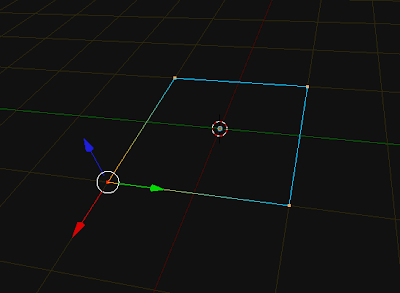


this makes a circle 12 verts, 12 edges. you can modify n_verts ( must be >= 3)
import bpy
import math
from math import sin, cos, radians

# variables
n_verts = 12
profile_radius = 1
section_angle = 360.0 / n_verts 
z_float = 0.0
Verts = []
Edges = []

for i in range(n_verts):
    x_float = sin(math.radians(section_angle*i))
    y_float = cos(math.radians(section_angle*i))
    Verts.append((x_float, y_float, z_float))

for i in range(n_verts):
    if i == n_verts-1:
        Edges.append([i, 0])
        break
    Edges.append([i, i+1])


profile_mesh = bpy.data.meshes.new("Base_Profile_Data")
profile_mesh.from_pydata(Verts, Edges, [])
profile_mesh.update()

profile_object = bpy.data.objects.new("Base_Profile", profile_mesh)
profile_object.data = profile_mesh

scene = bpy.context.scene
scene.objects.link(profile_object)
profile_object.select = True


here's a version using Euler, Vector, Vector.rotate, and math.radians
import bpy
import math
from math import radians, pi
from mathutils import Vector, Euler

# variables
n_verts = 20
profile_radius = 1
section_angle = 360.0 / n_verts 
z_float = 0.0
Verts = []
Edges = []

'''
>>> m = Vector((1.0, 0.0, 0.0))
>>> eul = Euler((0.0, 0.0, math.pi), 'XYZ')
>>> m.rotate(eul)
'''

ampline = Vector((1.0, 0.0, 0.0))
for i in range(n_verts):
    x_float = ampline.x
    y_float = ampline.y
    
    rad_angle = math.radians(section_angle)
    myEuler = Euler((0.0, 0.0, rad_angle),'XYZ')

    # changes the vector in place and is accumulative 
    ampline.rotate(myEuler)
    Verts.append((x_float, y_float, z_float))

for i in range(n_verts):
    if i == n_verts-1:
        Edges.append([i, 0])
        break
    Edges.append([i, i+1])


profile_mesh = bpy.data.meshes.new("Base_Profile_Data")
profile_mesh.from_pydata(Verts, Edges, [])
profile_mesh.update()

profile_object = bpy.data.objects.new("Base_Profile", profile_mesh)
profile_object.data = profile_mesh

scene = bpy.context.scene
scene.objects.link(profile_object)
profile_object.select = True
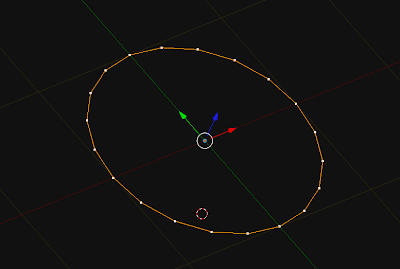


a slight variant of the above for loop in range, allows you to change the diameter as a function of the position on the circumference. This replaces lines 20-30 from the previous snippet
for i in range(n_verts):
    ampline = Vector((1.0, 0.0, 0.0))
    
    rad_angle = math.radians(section_angle*i)
    myEuler = Euler((0.0, 0.0, rad_angle),'XYZ')

    ampline.rotate(myEuler)
    x_float = ampline.x
    y_float = ampline.y
    
    Verts.append((x_float, y_float, z_float))

May 16, 2011

Blender 2.5 Python Sorting Through A List

Sometimes it's worth a few moments to sort a list procedurally.. there is probably a more pythonic way of sorting it. Here's what works for me, this list happens to be sorted. if it wasn't we'd do a sorted() on it, sorting by the value in the first index of each member list.

'''
if we want a histogram type list like this
[[0, 34, 345], [0, 36, 345]]
[[1, 34, 345], [1, 36, 345], [1, 37, 345]]
[[2, 34, 345]]
[[4, 34, 345], [4, 34, 345]]
[[7, 34, 345]]

from a list like this:
[[0,34,345],[0,36,345],[1,34,345],[1,36,345],[1,37,345],
[2,34,345],[4,34,345],[4,34,345],[7,34,345]]
we can write:
'''

jax = [[0,34,345],[0,36,345],[1,34,345],[1,36,345],[1,37,345],
[2,34,345],[4,34,345],[4,34,345],[7,34,345]]

multi_list = []
temp_list = []
# or multi_list, temp_list = [],[]

# get first track num, this is a one off necessity
tracknum = jax[0][0]

# start digging through the data
for i in range(len(jax)):
    tracknum_line = jax[i][0]
    if not tracknum_line == tracknum:

        #we aren't adding more items for this track
        multi_list.append(temp_list) 
        temp_list = [] # empty the storage list
        
    temp_list.append(jax[i])
    tracknum = tracknum_line

    # if last line, then add templist to multilist
    # we aren't adding more items for this track
    if i == len(jax)-1:
        multi_list.append(temp_list) 
        
for track in multi_list:
    print(track)