Featured post

new redirect for blender.org bpy docs.

http://www.blender.org/api/blender_python_api_current/ As of 10/11 november 2015 we can now link to the current api docs and not be worr...

Showing posts with label Euler. Show all posts

June 27, 2011

randomly placing vertices around a spherical surface

import bpy
import time
from math import radians
from random import randint
from mathutils import Vector, Euler

# constants
SPHERE_RADIUS = 0.7
NUM_VERTS = 116
MIN_DISTANCE = 0.19

# ttime in seconds beyond which iteration will be cancelled.
MAX_TIME = 20 

# consumable
Verts = []

# get start time
a_time = time.time()


def make_vertgon(Verts, object_name):
    object_mesh = object_name + "_mesh"
    mesh = bpy.data.meshes.new(object_mesh)
    mesh.from_pydata(Verts, [], [])
    mesh.update()
    new_object = bpy.data.objects.new(object_name, mesh)
    new_object.data = mesh
    
    scene = bpy.context.scene
    scene.objects.link(new_object)
    return


# populate the Verts list with verts randomly positioned around the radius
while(len(Verts)<=NUM_VERTS):
            
    ax_x = radians(randint(0, 360))
    ax_y = radians(randint(0, 360))
    ax_z = radians(randint(0, 360))
    myEul = Euler((ax_x, ax_y, ax_z), 'XYZ')
    
    outVec = Vector((SPHERE_RADIUS, 0.0, 0.0))
    outVec.rotate(myEul)

    # get current time
    b_time = time.time()
    
    # check time difference between current and start.
    elapsed_time = abs(a_time - b_time)    
    if elapsed_time > MAX_TIME:
        # breaking instead of running something that might be shy of infinite.
        break

    myToken = False    
    for B in Verts:       
        if (outVec-B).length < MIN_DISTANCE:
            myToken = True
            break
        
    if myToken == True:
        continue    
   
    Verts.append(outVec)
    
        
# draw verts randomly around the radius
make_vertgon(Verts, "stix")


'''
code notes:
    
this approach makes it obvious that SPHERE_RADIUS, NUM_VERTS and MIN_DISTANCE 
will reach equilibrium if their ratio approaches the optimal spread that 
NUM_VERTS has on the surface of the sphere.

The random nature of establishing vertex coordinates will often make it 
unlikely that any precise geometric distribution can be achieved.
'''

June 07, 2011

from_pydata a wave wrapping around a circle


import bpy
import math
from math import sin, radians, pi
from mathutils import Vector, Euler

# variables
z_float = 0.0
amp = 0.1
profile_radius = 1.0
n_petals = 14
n_verts = n_petals * 12
section_angle = 360.0 / n_verts
position = (2*(math.pi/(n_verts/n_petals)))

# consumables
Verts = []
Edges = []

# makes vertex coordinates
for i in range(n_verts):
# difference is a function of the position on the circumference
difference = amp * math.cos(i*position)
arm = profile_radius + difference
ampline = Vector((arm, 0.0, 0.0))

rad_angle = math.radians(section_angle*i)
myEuler = Euler((0.0, 0.0, rad_angle),'XYZ')

# changes the vector in place and because successive calls are accumulative
# we reset at the start of the loop.
ampline.rotate(myEuler)
x_float = ampline.x
y_float = ampline.y
Verts.append((x_float, y_float, z_float))

# makes edge keys
for i in range(n_verts):
if i == n_verts-1:
Edges.append([i, 0])
break
Edges.append([i, i+1])

# turns mesh into object and adds object to scene
profile_mesh = bpy.data.meshes.new("Base_Profile_Data")
profile_mesh.from_pydata(Verts, Edges, [])
profile_mesh.update()

profile_object = bpy.data.objects.new("Base_Profile", profile_mesh)
profile_object.data = profile_mesh

scene = bpy.context.scene
scene.objects.link(profile_object)
profile_object.select = True


if you add this:

difference = amp * math.cos(i*position)
if difference > 0:
difference = difference * .2

June 04, 2011

using from_pydata

this makes a square, 4 verts, 4 edges.
# be in object mode with nothing selected.

import bpy

# create 4 verts, string them together to make 4 edges.
coord1 = (-1.0, 1.0, 0.0)
coord2 = (-1.0, -1.0, 0.0)
coord3 = (1.0, -1.0, 0.0)
coord4 = (1.0, 1.0, 0.0)

Verts = [coord1, coord2, coord3, coord4]
Edges = [[0,1],[1,2],[2,3],[3,0]]

profile_mesh = bpy.data.meshes.new("Base_Profile_Data")
profile_mesh.from_pydata(Verts, Edges, [])
profile_mesh.update()

profile_object = bpy.data.objects.new("Base_Profile", profile_mesh)
profile_object.data = profile_mesh  # this line is redundant .. it simply overwrites .data

scene = bpy.context.scene
scene.objects.link(profile_object)
profile_object.select = True
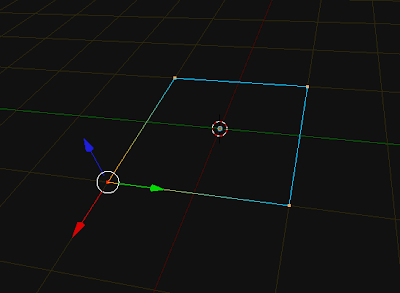


this makes a circle 12 verts, 12 edges. you can modify n_verts ( must be >= 3)
import bpy
import math
from math import sin, cos, radians

# variables
n_verts = 12
profile_radius = 1
section_angle = 360.0 / n_verts 
z_float = 0.0
Verts = []
Edges = []

for i in range(n_verts):
    x_float = sin(math.radians(section_angle*i))
    y_float = cos(math.radians(section_angle*i))
    Verts.append((x_float, y_float, z_float))

for i in range(n_verts):
    if i == n_verts-1:
        Edges.append([i, 0])
        break
    Edges.append([i, i+1])


profile_mesh = bpy.data.meshes.new("Base_Profile_Data")
profile_mesh.from_pydata(Verts, Edges, [])
profile_mesh.update()

profile_object = bpy.data.objects.new("Base_Profile", profile_mesh)
profile_object.data = profile_mesh

scene = bpy.context.scene
scene.objects.link(profile_object)
profile_object.select = True


here's a version using Euler, Vector, Vector.rotate, and math.radians
import bpy
import math
from math import radians, pi
from mathutils import Vector, Euler

# variables
n_verts = 20
profile_radius = 1
section_angle = 360.0 / n_verts 
z_float = 0.0
Verts = []
Edges = []

'''
>>> m = Vector((1.0, 0.0, 0.0))
>>> eul = Euler((0.0, 0.0, math.pi), 'XYZ')
>>> m.rotate(eul)
'''

ampline = Vector((1.0, 0.0, 0.0))
for i in range(n_verts):
    x_float = ampline.x
    y_float = ampline.y
    
    rad_angle = math.radians(section_angle)
    myEuler = Euler((0.0, 0.0, rad_angle),'XYZ')

    # changes the vector in place and is accumulative 
    ampline.rotate(myEuler)
    Verts.append((x_float, y_float, z_float))

for i in range(n_verts):
    if i == n_verts-1:
        Edges.append([i, 0])
        break
    Edges.append([i, i+1])


profile_mesh = bpy.data.meshes.new("Base_Profile_Data")
profile_mesh.from_pydata(Verts, Edges, [])
profile_mesh.update()

profile_object = bpy.data.objects.new("Base_Profile", profile_mesh)
profile_object.data = profile_mesh

scene = bpy.context.scene
scene.objects.link(profile_object)
profile_object.select = True
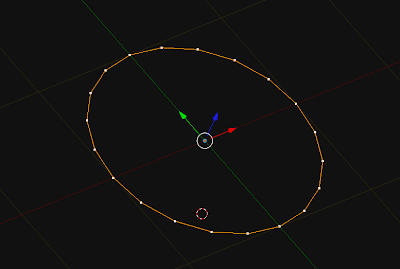


a slight variant of the above for loop in range, allows you to change the diameter as a function of the position on the circumference. This replaces lines 20-30 from the previous snippet
for i in range(n_verts):
    ampline = Vector((1.0, 0.0, 0.0))
    
    rad_angle = math.radians(section_angle*i)
    myEuler = Euler((0.0, 0.0, rad_angle),'XYZ')

    ampline.rotate(myEuler)
    x_float = ampline.x
    y_float = ampline.y
    
    Verts.append((x_float, y_float, z_float))

May 22, 2011

Blender 2.5 Python 3.2 Vector Translate Euler

updated 21 september 2012 for blender 2.6.

Hoping to figure this thing out in more detail, here's a snippet that seems to work. It also gives most basic insight into how to translate a Vector using Euler (transform?)
import bpy
from mathutils import Vector, Euler

myTrans = Vector((0.0,0.0,.5))
myEuler = Euler((0.0, 0.3, 0.0),'XYZ')
for i in range(14):
    myVec = Vector((0.0, 0.3, 0.0))
    bpy.ops.mesh.extrude_region_move(TRANSFORM_OT_translate={"value":myTrans})
    bpy.ops.transform.rotate(value=(0.3,), axis=myVec)
    myTrans.rotate(myEuler)


- Add a new circle
- select the edges
- run the script.


Here is a slight modification, it produces a spiral
import bpy
from mathutils import Vector, Euler

myTrans = Vector((0.0,0.0,.5))
myEuler = Euler((0.2, 0.3, 0.0),'XYZ')
for i in range(34):

    myVec = Vector((0.2, 0.3, 0.0))
    bpy.ops.mesh.extrude_region_move(TRANSFORM_OT_translate={"value":myTrans})

    bpy.ops.transform.rotate(value=(0.35,), axis=myVec)
    myTrans.rotate(myEuler)    


while, the one below produces a more spring like coil.
import bpy
from mathutils import Vector, Euler

translation = Vector((0.0, 0.0, .5))

for i in range(134):
    t_dict = {"value": translation}
    bpy.ops.mesh.extrude_region_move(TRANSFORM_OT_translate=t_dict)
    bpy.ops.transform.rotate(value=(0.358,), axis=Vector((0.2, 0.3, 0.0)))
    translation.rotate(Euler((0.2, 0.3, 0.0),'XYZ'))
    

i applied some subsurf to it later.